


Introduction
What if you could detect every error in your electrical schematic in seconds instead of spending hours manually hunting for mistakes and generate your BOM automatically, perfectly formatted and ready to go? With SOLIDWORKS Electrical 2D, this is now reality.
Two game-changing tools make it possible:
- Design Rule Checker (DRC)
- Automated Report Generation
To automatically generate reports, you must first check your schematic and ensure it is completely error-free using the Design Rule Checker (DRC).
- Even a small schematic error can lead to costly delays, rework, and project setbacks.
- The Design Rule Checker (DRC) automatically scans your schematic for errors based on predefined rules. No more guesswork. No more overlooked mistakes
- Save Time: Detect errors instantly, rather than spending hours on manual checks.
- Reduce Mistakes: DRC ensures your schematics are 100% error-free
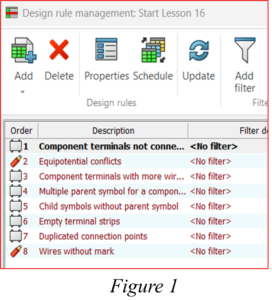
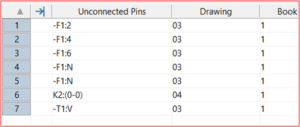
Figure 2
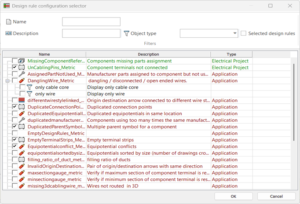
Figure 3Figure 1 shows the predefined rules setup in DRC and the corresponding errors detected, shown page-wise and project-wise for easy correction.
Figure 2 illustrates corresponding errors detected, shown page-wise and project-wise for easy correction.
Figure 3 shows the formulas used in DRC that can be edited or customized to define how errors are detected.
Automated Report Generation instantly converts your verified schematic into accurate, professional reports like BOMs, wire lists, and component tables instantly.
Since reports are generated directly from the schematic data, the information is always up-to-date and synchronized with the design.
- Save hours spent on manual documentation
- Eliminate reporting errors and inconsistencies
- Generate professional, client-ready reports instantly
- Maintain standardized documentation across projects
With Automated Report Generation, your electrical schematic becomes more than just a design it becomes a complete documentation engine.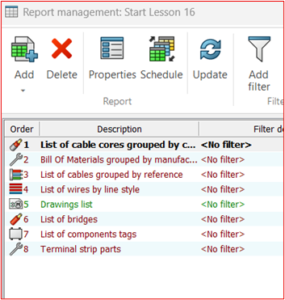
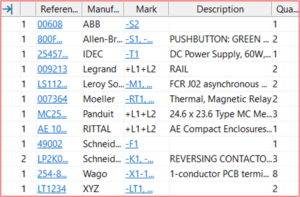
Figure 4 Figure 5
Figure 4 displays the predefined report templates, ready to adapt to your needs.
Figure 5 shows generated reports that can be added directly to the project or exported as Excel/PDF.
These reports are customizable, letting you choose which columns and data to includes as shown in the Figure 6. You can adjust them to fit your project needs and display only the necessary information.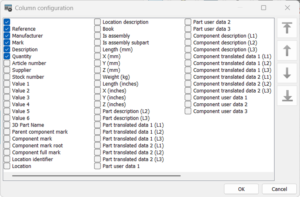
Figure 6
Stop wasting time on manual checks and tedious reporting. With SOLIDWORKS Electrical 2D, your team can work faster, smarter, and error-free, while producing documentation that’s ready for clients, manufacturing, or audits—all in a fraction of the time.
Experience the future of electrical design today. Get SOLIDWORKS Electrical 2D and revolutionize your workflow!

