SOLIDWORKS Plastic
Overview
SOLIDWORKS Plastics – Advanced Injection Molding Simulation for Defect Prevention & Design Optimization
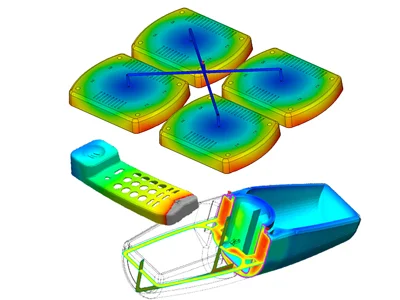
SOLIDWORKS Plastics ensures of bringing easy-to-use injection molding simulation directly to the design engineers of injection molds and plastic parts which simulates how melted plastic flows during the injection molding process to predict manufacturing-related defects on molds and parts.
You can quickly try manufacturability while you design, to improve part quality, accelerate time to market and to eliminate costly mold rework. Aa a Results Adviser provides troubleshooting steps and practical design advice to help diagnose and solve potential problems.
Core Functionalities
Flow Simulation
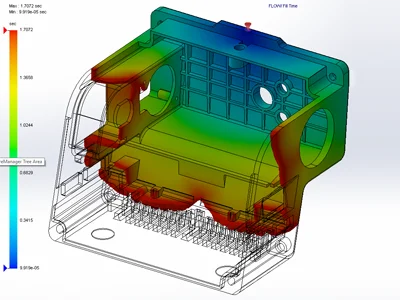
Predicts how melted plastic flows during the injection molding process
Defect Prevention
Identifies potential manufacturing defects such as short shots, weld lines, and air traps.
Early Design Validation
Enables designers to optimize parts for manufacturability in the early stages of design.
CAD Integration
Fully embedded within the SOLIDWORKS CAD environment, allowing modification and analysis at the same time.
Ease of Use
Takes only minutes to learn and does not require extensive analysis or plastics expertise.
Team Communication
Web-based HTML reports quickly share simulation results and design advice with the design-to-manufacturing team.
Mold Layout Analysis
Analyze and create single cavity, multi-cavity, and family mold layouts, including runners, gates, and sprues.
Production Optimization
Estimate cycle time, balance runner systems, shot size, and clamp tonnage to optimize feed system design and avoid mold rework.
Key Features
Works seamlessly with:
- Predicts plastic flow during injection molding.
- Identifies manufacturing defects such as short shots, weld lines, and air traps.
- Validates manufacturability early in the design process.
- CAD-integrated environment for real-time optimization.
- Easy to learn and use, requiring no extensive plastics expertise.
- Web-based HTML reports for fast and clear team communication.
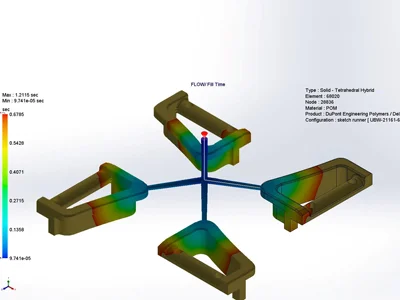
- Analyze and create single cavity, multi-cavity, and family mold layouts.
- Estimate cycle time, shot size, and clamp tonnage.
- Optimize feed system design to avoid costly mold rework.
| Features |
|---|
|
SOLIDWORKS 3D CAD |
|
Part and Assembly Modelling |
|
Design Reuse and Automation |
|
Interference Check |
|
Collaborate and Share CAD Data |
|
Advanced CAD File Import/Export – 3D Interconnect |
|
First Pass Analysis Tools – Simulation Xpress |
|
Productivity Tools |
|
SOLIDWORKS CAM Standard* |
|
Design for Manufacturing |
|
Xtended Reality (XR) Exporter |
|
SOLIDWORKS Visualize Standard* |
|
CAD Libraries (SOLIDWORKS Toolbox) |
|
Design for Cost & Estimation (SOLIDWORKS Costing) |
|
ECAD/MCAD Collaboration (CircuitWorks™) |
|
CAD Standards Checking |
|
Automated Tolerance Stack-Up Analysis (TolAnalyst) |
|
SOLIDWORKS File Management |
|
Reverse Engineering (ScanTo3D) |
|
eDrawings® Professional |
|
Time – Based Motion Analysis |
|
Linear Static Analysis for Part and Assemblies |
|
Routing of Pipes and Tubes |
|
Routing of Rectangular and Other Sections |
|
Advanced Surface Flattening |
|
Assembly Level Cost Roll Up |
|
Electrical Routing |
| Standard |
|---|
|
|
|
|
|
|
|
|
|
|
|
|
|
|
|
|
|
|
|
|
|
|
|
|
|
|
|
|
|
|
|
|
|
|
|
|
|
|
|
|
|
|
|
|
|
|
|
|
|
|
|
|
|
|
| Professional |
|---|
|
|
|
|
|
|
|
|
|
|
|
|
|
|
|
|
|
|
|
|
|
|
|
|
|
|
|
|
|
|
|
|
|
|
|
|
|
|
|
|
|
|
|
|
|
|
|
|
|
|
|
|
|
|
| Premium |
|---|
|
|
|
|
|
|
|
|
|
|
|
|
|
|
|
|
|
|
|
|
|
|
|
|
|
|
|
|
|
|
|
|
|
|
|
|
|
|
|
|
|
|
|
|
|
|
|
|
|
|
|
|
|
|
Choosing the right SOLIDWORKS package depends on your design needs, team size, and project complexity.
From Standard to Premium, we help you identify the ideal solution that maximizes performance while staying within budget.
-
Want to buy
SOLIDWORKS Plastic?
Services & Training
We help you solve engineering challenges, together.
Whether you’re looking to outsource expertise or upskill your team, we work as a seamless extension of your organization to deliver measurable results.
Engineering Services
We help turn complex ideas into manufacturable products through robust design, analysis, and engineering support—focused on accuracy, efficiency, and real-world performance.
SOLIDWORKS Training
Develop practical SOLIDWORKS skills with flexible training programs designed for engineers, designers, and teams—covering essentials through advanced workflows.