SOLIDWORKS Visualize
Overview
SOLIDWORKS Visualize – Advanced 3D Rendering & Animation for Immersive Product Marketing
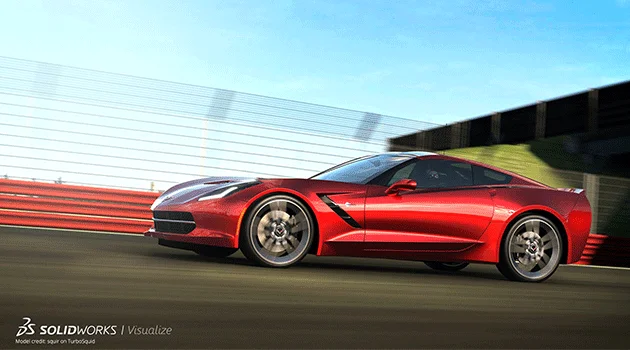
SOLIDWORKS Visualize enables you to bring products to life by converting CAD data into photo-realistic images, bewitching animations, and smart interactive 3D contents. It is a boon for digital content marketers and product advertisers, supporting impactful product marketing and customer presentations.
No more costly studio setups and high-end photo devices including cameras, lighting, and background screens for product photoshoots. SOLIDWORKS Visualize solutions are cost effective and easy to use, delivering high-quality visual outputs in less time.
Core Functionalities
Photo-Realistic Rendering
Convert CAD data (irrespective of any CAD formats) into photo-quality images in the easiest manner.
High-Quality Animations
Create compelling product animations, including 360° turntable and sun study animations.
VR & Panoramic Outputs
Generate immersive VR contents and panoramic visual experiences.
Vehicle Driving Simulation
Produce realistic vehicle motion and driving simulation visuals.
Early Marketing Visuals
Deliver photorealistic imagery to marketing teams even before product development is completed.
Cost & Prototype Reduction
Drastically reduce costly studio setups and minimize the need for physical prototypes.
Sales Focused Engagement
Improve sales reviews, support final design decisions, create product awareness, and shorten the buyer’s journey with virtual replicas.
Accelerated Time-to-Market
Reach products to market at appealing interactive contents allowing more design time and faster customer engagement.
Features
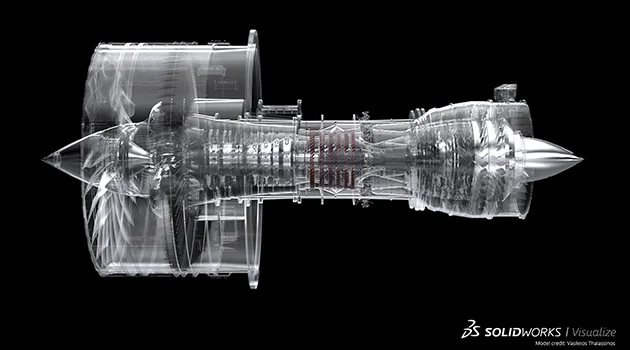
Photo-Realistic Rendering for Product Marketing
- Convert CAD data into photo-realistic images in an easy and cost-effective manner
- No costly studio setups or high-end photo devices required
- Deliver photorealistic imagery to marketing earlier for web and print promotion
- Leverage CAD data (irrespective of CAD formats) into photo-quality content
- Save time and allow more focus on design development
Advanced Animations & Interactive 3D Content Creation
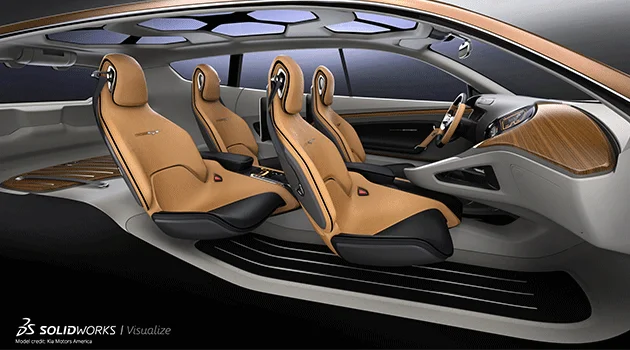
- Create high quality animations including 360° turntable & sun study animations
- Generate interactive 3D contents (HTML based) and promotion videos
- Produce VR contents and panoramic outputs
- Develop vehicle driving simulations
- Reach products to market at a vibrant rate with appealing interactive contents
- Create product awareness and stronger customer engagement
| Features |
|---|
|
SOLIDWORKS 3D CAD |
|
Part and Assembly Modelling |
|
Design Reuse and Automation |
|
Interference Check |
|
Collaborate and Share CAD Data |
|
Advanced CAD File Import/Export – 3D Interconnect |
|
First Pass Analysis Tools – Simulation Xpress |
|
Productivity Tools |
|
SOLIDWORKS CAM Standard* |
|
Design for Manufacturing |
|
Xtended Reality (XR) Exporter |
|
SOLIDWORKS Visualize Standard* |
|
CAD Libraries (SOLIDWORKS Toolbox) |
|
Design for Cost & Estimation (SOLIDWORKS Costing) |
|
ECAD/MCAD Collaboration (CircuitWorks™) |
|
CAD Standards Checking |
|
Automated Tolerance Stack-Up Analysis (TolAnalyst) |
|
SOLIDWORKS File Management |
|
Reverse Engineering (ScanTo3D) |
|
eDrawings® Professional |
|
Time – Based Motion Analysis |
|
Linear Static Analysis for Part and Assemblies |
|
Routing of Pipes and Tubes |
|
Routing of Rectangular and Other Sections |
|
Advanced Surface Flattening |
|
Assembly Level Cost Roll Up |
|
Electrical Routing |
| Standard |
|---|
|
|
|
|
|
|
|
|
|
|
|
|
|
|
|
|
|
|
|
|
|
|
|
|
|
|
|
|
|
|
|
|
|
|
|
|
|
|
|
|
|
|
|
|
|
|
|
|
|
|
|
|
|
|
| Professional |
|---|
|
|
|
|
|
|
|
|
|
|
|
|
|
|
|
|
|
|
|
|
|
|
|
|
|
|
|
|
|
|
|
|
|
|
|
|
|
|
|
|
|
|
|
|
|
|
|
|
|
|
|
|
|
|
| Premium |
|---|
|
|
|
|
|
|
|
|
|
|
|
|
|
|
|
|
|
|
|
|
|
|
|
|
|
|
|
|
|
|
|
|
|
|
|
|
|
|
|
|
|
|
|
|
|
|
|
|
|
|
|
|
|
|
Choosing the right SOLIDWORKS package depends on your design needs, team size, and project complexity.
From Standard to Premium, we help you identify the ideal solution that maximizes performance while staying within budget.
-
Want to buy
SOLIDWORKS Visualizer?
Services & Training
We help you solve engineering challenges, together.
Whether you’re looking to outsource expertise or upskill your team, we work as a seamless extension of your organization to deliver measurable results.
Engineering Services
We help turn complex ideas into manufacturable products through robust design, analysis, and engineering support—focused on accuracy, efficiency, and real-world performance.
SOLIDWORKS Training
Develop practical SOLIDWORKS skills with flexible training programs designed for engineers, designers, and teams—covering essentials through advanced workflows.