

3DEXPERIENCE SOLIDWORKS
Overview
SOLIDWORKS – Powerful 3D CAD with Built-in Simulation, PDM, PLM Capabilities
In the modern world, product development can be challenging with scattered and remote team members. With built-in PDM and PLM capabilities, the 3DEXPERIENCE Platform offers a completely new and distinct method to collaborate and communicate while managing your CAD and non-CAD data.
Why 3DEXPERIENCE SOLIDWORKS?
- The traditional workplace is evolving.
- Design teams need flexible, remote collaboration.
- Secure data storage with anytime, anywhere access.
- Advanced project management with integrated planning tools.
- Reduced costs by eliminating on-premises servers.
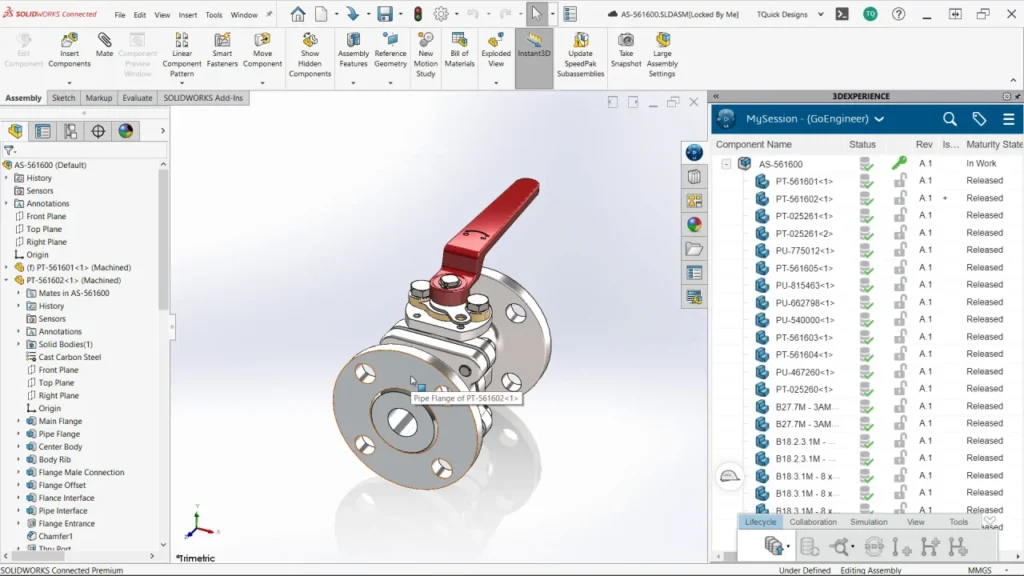
Benefits
Unified Desktop & Cloud Access
Seamless access to SOLIDWORKS Data on Desktop as well as Cloud for collaboration
Secure Remote Collaboration
Storing on Secure Cloud for instantaneous access by collaboration team members where ever they are located
Cloud-Based Data Storage
Securely store all design data on the cloud with centralized access, ensuring your teams can retrieve, share, and collaborate on files anytime, from anywhere.
Role-Based Licensing
Assign role-based licensing, ensuring the right people have the right level of control while maintaining data security and process.
Traceability
Automatically tracks design changes and revisions, ensuring full traceability and confidence that teams always work on the latest approved data.
Less Management
Empowers Design Teams to concentrate on Innovation while taking out the semantics of storage, data and revision management.
Core Design Functions
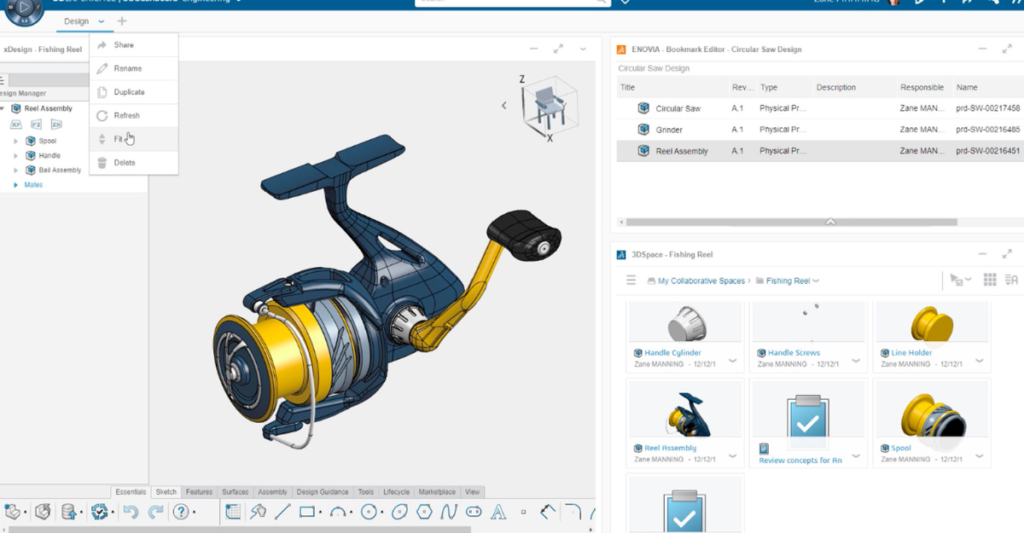
3D Creator – Parametric Design Capabilities
- Adapts to the evolving workplace with flexible design access.
- Enables work anytime, anywhere, with easy accessibility.
- Delivers industry-standard 3D parametric design methodologies.
- Incorporates modern innovations into the design workflow.
- Supports efficient and flexible design processes.
3D Sculptor – Organic & Conceptual Design
- Design organic and complex 3D shapes.
- Utilize 3D Sub-D modeling (Digital Clay Modeling).
- Enable seamless and rapid modeling workflows.
- Convert concepts into conventional designs efficiently.
- Eliminate re-modeling and reduce re-work.
3D SheetMetal Creator – Precision Sheet Metal Design
- Perform classic parametric modeling for sheet metal.
- Specialized user interface tailored for sheet metal users.
- Create precise and detailed Sheet Metal designs.
- Ensure designs are ready for manufacturing requirements
3D Structure Creator – Frame & Structure Design
- Enhance frame and structure modeling capabilities.
- Create feature-based structural designs.
- Automatically generate cut lists.
- Enable faster and more efficient manufacturing.
3D Mold Creator – Intelligent Mold Design
- Leverages the capabilities of the 3DEXPERIENCE Platform.
- Provides clear and streamlined procedures for mold geometry creation.
- Reduces mold design complexity.
- Uses built-in mold design workflow intelligence
- Automatically creates parting lines and shut-offs
- Accelerates the mold design process
Drafter – 2D Drawing Creation from 3D Models
- Creates accurate 2D drawings from 3D parts and assemblies developed using browser-based xApps
- Provides all required drawing views with clear dimensions and annotations
- Ensures instant updates to 2D drawings whenever changes are made to the 3D models
- Maintains design consistency between 3D models and manufacturing drawings
- Supports clear and effective communication of manufacturing information
- Reduces rework by keeping drawings always in sync with design changes
3D Mold Creator – Intelligent Mold Design
- Leverages the capabilities of the 3DEXPERIENCE Platform.
- Provides clear and streamlined procedures for mold geometry creation.
- Reduces mold design complexity.
- Uses built-in mold design workflow intelligence
- Automatically creates parting lines and shut-offs
- Accelerates the mold design process
3D Render – Photorealistic Visuals & Product Animations
- Creates photorealistic 3D renders directly from your 3D CAD data
- Enables easy generation of marketing-ready visual assets
- Produces high-quality images with realistic materials, lighting, and textures
- Supports real-world working animations to showcase product functionality
- Helps visualize the true nature of the product before physical production
- Enhances product presentation for websites, brochures, and digital marketing
Business Innovator – Smart Cloud Collaboration
- Enables an interactive cloud platform for cross-functional collaboration
- Helps teams share ideas and exchange information in real time
- Improves informed decision-making at a lower cost
- Bridges gaps in information management
- Enhances overall productivity and efficiency
Industry Innovator – Digital PLM & Collaborative Management
- Delivers an innovative approach to collaboration, control, and capability enhancement
- Digitally transforms day-to-day engineering and business activities
- Enables end-to-end Product Lifecycle Management (PLM)
- Simplifies revision and change management
- Streamlines workflow administration and task management
- Powered by the 3DEXPERIENCE Platform for collaborative industry innovation
Pricing
| Features |
|---|
|
SOLIDWORKS 3D CAD |
|
Part and Assembly Modelling |
|
Design Reuse and Automation |
|
Interference Check |
|
Collaborate and Share CAD Data |
|
Advanced CAD File Import/Export – 3D Interconnect |
|
First Pass Analysis Tools – Simulation Xpress |
|
Productivity Tools |
|
SOLIDWORKS CAM Standard* |
|
Design for Manufacturing |
|
Xtended Reality (XR) Exporter |
|
SOLIDWORKS Visualize Standard* |
|
CAD Libraries (SOLIDWORKS Toolbox) |
|
Design for Cost & Estimation (SOLIDWORKS Costing) |
|
ECAD/MCAD Collaboration (CircuitWorks™) |
|
CAD Standards Checking |
|
Automated Tolerance Stack-Up Analysis (TolAnalyst) |
|
SOLIDWORKS File Management |
|
Reverse Engineering (ScanTo3D) |
|
eDrawings® Professional |
|
Time – Based Motion Analysis |
|
Linear Static Analysis for Part and Assemblies |
|
Routing of Pipes and Tubes |
|
Routing of Rectangular and Other Sections |
|
Advanced Surface Flattening |
|
Assembly Level Cost Roll Up |
|
Electrical Routing |
| Standard |
|---|
|
|
|
|
|
|
|
|
|
|
|
|
|
|
|
|
|
|
|
|
|
|
|
|
|
|
|
|
|
|
|
|
|
|
|
|
|
|
|
|
|
|
|
|
|
|
|
|
|
|
|
|
|
|
| Professional |
|---|
|
|
|
|
|
|
|
|
|
|
|
|
|
|
|
|
|
|
|
|
|
|
|
|
|
|
|
|
|
|
|
|
|
|
|
|
|
|
|
|
|
|
|
|
|
|
|
|
|
|
|
|
|
|
| Premium |
|---|
|
|
|
|
|
|
|
|
|
|
|
|
|
|
|
|
|
|
|
|
|
|
|
|
|
|
|
|
|
|
|
|
|
|
|
|
|
|
|
|
|
|
|
|
|
|
|
|
|
|
|
|
|
|
Services & Training
We help you solve engineering challenges, together.
Whether you’re looking to outsource expertise or upskill your team, we work as a seamless extension of your organization to deliver measurable results.
Engineering Services
We help turn complex ideas into manufacturable products through robust design, analysis, and engineering support—focused on accuracy, efficiency, and real-world performance.
SOLIDWORKS Training
Develop practical SOLIDWORKS skills with flexible training programs designed for engineers, designers, and teams—covering essentials through advanced workflows.
FAQ
3DEXPERIENCE is a business and innovation platform that provides organizations with a holistic, real-time vision of their business activity and ecosystem. It connects people, ideas, data and solutions in a single collaborative environment empowering businesses from startups to large enterprises, to innovate, produce and trade in entirely new ways.
The 3DEXPERIENCE platform on the cloud provides instant access to a catalog of apps and online services to design, simulate, inform and collaborate on a project with your ecosystem.
Click the 3DEXPERIENCE Launcher in the Windows system tray. Log in to the 3DPassport dialog box with your 3DEXPERIENCE credentials. The 3D Dashboard in the 3DEXPERIENCE platform opens.
The 3DEXPERIENCE SOLIDWORKS roles are not replacing SOLIDWORKS CAD Desktop. Both solutions will be available to customers, offering flexibility based on their needs and situation.
Customers can also select Collaborative Designer for SOLIDWORKS (UES-OC) to connect SOLIDWORKS CAD Desktop to the 3DEXPERIENCE platform in the cloud.
The 3DEXPERIENCE Cloud platform gives you everything you need to bring your idea to reality, including design and engineering, manufacturing and production, simulation, governance and collaboration. Find a cloud plan that matches your needs and start today.
- Industry – leading SolidWorks 3D CAD capabilities
- Safe and secure cloud data management
- Simplified collaboration with team members, customers, and suppliers
- Data accessible anywhere, anytime, and from any device
Yes, which integrate SOLIDWORKS 3D CAD connected with the 3DEXPERIENCE platform, a single cloud-based, product development environment.
SOLIDWORKS Desktop and 3DEXPERIENCE SOLIDWORKS cannot be installed on the same machine. However, users can install and run prior versions of SOLIDWORKS CAD Desktop (e.g., SOLIDWORKS 2019 and 3DEXPERIENCE SOLIDWORKS Standard).
There is separate role called Project Planner that allows you to manage projects, get project status updates, and allocate tasks to the team. Also, arrange the appropriate time for each work.

