

SOLIDWORKS PLM
We are an authorized SOLIDWORKS PLM reseller in Tamil Nadu, serving Chennai, Coimbatore, and Trichy. As a trusted Dassault Systèmes partner, we provide cloud-based product lifecycle management solutions.
Overview
SOLIDWORKS PLM for Centralized Data Control & Seamless Collaboration
Managing product data, coordinating engineering changes, and maintaining collaboration across departments can be challenging when information is scattered across multiple systems. Disconnected processes often lead to version conflicts, delayed approvals, and limited visibility into product development.
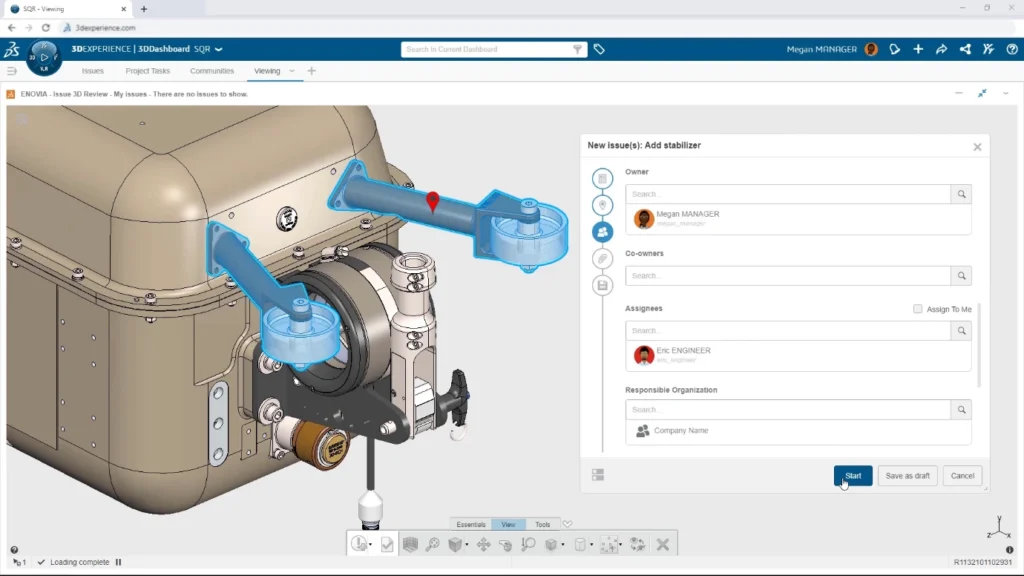
SOLIDWORKS PLM, built on the 3DEXPERIENCE Platform, provides a connected product lifecycle management environment that centralizes product data, processes, and collaboration. It enables engineering teams to manage product structures, control design releases, track changes, and collaborate efficiently across the entire organization.
Whether companies need to organize engineering data, manage complex product configurations, or coordinate with manufacturing and suppliers, SOLIDWORKS PLM provides a scalable platform that improves visibility, ensures traceability, and accelerates product development.
Core Functionalities
Centralized Product Data Management
Maintain a single source of truth for product data, including CAD models, product structures, documents, and specifications.
Engineering Release Management
Control product lifecycle states and automate release processes with structured workflows and approval management.
Change and Process Governance
Manage engineering changes, approvals, and revisions through configurable workflows to ensure full traceability and compliance.
Product Structure & Configuration Management
Create and manage complex product structures, variants, and configurations while maintaining clear relationships between components.
Cloud-Based Platform Integration
Leverage cloud connectivity from the 3DEXPERIENCE Platform to access product data securely from anywhere while ensuring data consistency across the organization.
Cross-Team Collaboration
Enable real-time collaboration between engineering, project management, manufacturing, and supply chain teams within the same platform environment.
Benefits

SOLIDWORKS PLM Standard – Benefits
- Centralized management of engineering data and product specifications
- Structured engineering release workflows
- Integrated project planning for engineering teams
- Improved visibility across product development activities
- Ideal for organizations beginning their PLM adoption journey

SOLIDWORKS PLM Professional – Benefits
- Advanced product structure management and editing
- Built-in change governance and approval processes
- Support for configured engineering and complex product design
- Integration for connected software development workflows
- Enhanced collaboration between engineering and project teams
SOLIDWORKS PLM Premium – Benefits
- Complete product lifecycle management across engineering, manufacturing, and supply chain
- Advanced configuration and variant management for complex products
- Requirements management and traceability across the development process
- Supplier collaboration and qualification capabilities
- End-to-end visibility from product design to manufacturing and delivery
| Features |
|---|
|
Best For |
|
Engineering Release |
|
Project Planning |
|
Specification Management |
|
Product Structure Editor |
|
Change Governance |
|
Configured Engineering |
|
Connected Software |
|
Model Definition |
|
Requirements Management |
|
Variant Management |
|
Manufacturing Items Management |
|
Supply Network Management |
|
Supplier Collaboration |
|
Platform Learning Tools |
| Standard |
|---|
|
Teams starting with structured product data management |
|
|
|
|
|
|
|
– |
|
– |
|
– |
|
– |
|
– |
|
– |
|
– |
|
– |
|
– |
|
– |
|
|
| Professional |
|---|
|
Organizations managing complex engineering data and configurations |
|
|
|
|
|
|
|
|
|
|
|
|
|
|
|
– |
|
– |
|
– |
|
– |
|
– |
|
– |
|
|
| Premium |
|---|
|
Enterprises requiring complete lifecycle management |
|
|
|
|
|
|
|
|
|
|
|
|
|
|
|
|
|
|
|
|
|
|
|
|
|
|
|
|
| Features | Standard | Professional | Premium |
|---|---|---|---|
|
Best For |
Teams starting with structured product data management |
Organizations managing complex engineering data and configurations |
Enterprises requiring complete lifecycle management |
|
Engineering Release |
|
|
|
|
Project Planning |
|
|
|
|
Specification Management |
|
|
|
|
Platform Learning Tool |
|
|
|
|
Product Structure Editor |
|
|
|
|
Change Governance |
|
|
|
|
Configured Engineering |
|
|
|
|
Connected Software |
|
|
|
|
Model Definition |
|
|
|
|
Requirements Management |
|
|
|
|
Variant Management |
|
|
|
|
Manufacturing Items Management |
|
|
|
|
Supply Network Management |
|
|
|
|
Supplier Collaboration |
|
|
|
|
Platform Learning Tools |
|
|
|
Choosing the right SOLIDWORKS package depends on your design needs, team size, and project complexity.
From Standard to Premium, we help you identify the ideal solution that maximizes performance while staying within budget.
-
Want to buy
SOLIDWORKS PLM?
| Features |
|---|
|
SOLIDWORKS 3D CAD |
|
Part and Assembly Modelling |
|
Design Reuse and Automation |
|
Interference Check |
|
Collaborate and Share CAD Data |
|
Advanced CAD File Import/Export – 3D Interconnect |
|
First Pass Analysis Tools – Simulation Xpress |
|
Productivity Tools |
|
SOLIDWORKS CAM Standard* |
|
Design for Manufacturing |
|
Xtended Reality (XR) Exporter |
|
SOLIDWORKS Visualize Standard* |
|
CAD Libraries (SOLIDWORKS Toolbox) |
|
Design for Cost & Estimation (SOLIDWORKS Costing) |
|
ECAD/MCAD Collaboration (CircuitWorks™) |
|
CAD Standards Checking |
|
Automated Tolerance Stack-Up Analysis (TolAnalyst) |
|
SOLIDWORKS File Management |
|
Reverse Engineering (ScanTo3D) |
|
eDrawings® Professional |
|
Time – Based Motion Analysis |
|
Linear Static Analysis for Part and Assemblies |
|
Routing of Pipes and Tubes |
|
Routing of Rectangular and Other Sections |
|
Advanced Surface Flattening |
|
Assembly Level Cost Roll Up |
|
Electrical Routing |
| Standard |
|---|
|
|
|
|
|
|
|
|
|
|
|
|
|
|
|
|
|
|
|
|
|
|
|
|
|
|
|
|
|
|
|
|
|
|
|
|
|
|
|
|
|
|
|
|
|
|
|
|
|
|
|
|
|
|
| Professional |
|---|
|
|
|
|
|
|
|
|
|
|
|
|
|
|
|
|
|
|
|
|
|
|
|
|
|
|
|
|
|
|
|
|
|
|
|
|
|
|
|
|
|
|
|
|
|
|
|
|
|
|
|
|
|
|
| Premium |
|---|
|
|
|
|
|
|
|
|
|
|
|
|
|
|
|
|
|
|
|
|
|
|
|
|
|
|
|
|
|
|
|
|
|
|
|
|
|
|
|
|
|
|
|
|
|
|
|
|
|
|
|
|
|
|
Services & Training
We help you solve engineering challenges, together.
Whether you’re looking to outsource expertise or upskill your team, we work as a seamless extension of your organization to deliver measurable results.
Engineering Services
We help turn complex ideas into manufacturable products through robust design, analysis, and engineering support—focused on accuracy, efficiency, and real-world performance.
SOLIDWORKS Training
Develop practical SOLIDWORKS skills with flexible training programs designed for engineers, designers, and teams—covering essentials through advanced workflows.
FAQ
2D CADs are mainly used to create detailing and drafting whereas SOLIDWORKS helps in designing and developing in 3D which helps in better visual understanding. It also helps to create drafting and detailed manufacturing drawings.
Yes, SOLIDWORKS Supports the import of Other 3D CAD Files such as Autodesk Inventor, Pro/ENGINEER and Creo Parametric, Solid Edge, Unigraphics. It also supports the import of Neutral Files such as IGES/IGS, STEP, Parasolid, etc.
SOLIDWORKS Files
SOLIDWORKS Files (*.sldprt; *.sldasm)
SOLIDWORKS Assembly (*.asm; *.sldasm)
SOLIDWORKS Drawing (*.drw; *.slddrw)
SOLIDWORKS Part (*.prt; *.sldprt)
SOLIDWORKS SLDXML (*.sldxml)
Other Supported Formats
3D Manufacturing Format (*.3mf)
ACIS (*.sat; *.sab; *.asat; *.asab)
Add-Ins (*.dll)
Adobe Illustrator Files (*.ai)
Adobe Photoshop Files (*.psd)
Autodesk AutoCAD Files (*.dwg; *.dxf)
Autodesk Inventor Files (*.ipt; *.iam)
CADKEY (*.prt; *.ckd)
CATIA Graphics (*.cgr)
CATIA V5 (*.catpart; *.catproduct)
Interoperability & Exchange Formats
IDF (*.emn; *.brd; *.bdf; *.idb)
IFC 2x3 (*.ifc)
IGES (*.igs; *.iges)
JT (*.jt)
Library Feature Part (*.lfp; *.sldlfp)
Mesh Files (*.stl; *.obj; *.off; *.ply; *.ply2)
Parasolid (*.x_t; *.x_b; *.xmt_txt; *.xmt_bin)
PTC Creo Files (*.prt; *.asm; *.xpr)
Rhino (*.3dm)
Solid Edge Files (*.par; *.psm; *.asm)
STEP AP203 / AP214 / AP242 (*.step; *.stp)
Template Files (*.prtdot; *.asmdot; *.drwdot)
Unigraphics / NX (*.prt)
VDAFS (*.vda)
VRML (*.wrl)
Starting from SOLIDWORKS 2017, 3D Interconnect replaces SOLIDWORKS’ current translation capabilities with new technology and workflows for working with third-party native CAD data.
You can:
a. Insert proprietary CAD data directly into a SOLIDWORKS assembly without converting it to a SOLIDWORKS file.
b. Open the proprietary 3D CAD format in the SOLIDWORKS software with its associative link to the original part.
c. Update changes in the SOLIDWORKS file if you update the proprietary CAD data in its authoring application by maintaining all downstream features created in SOLIDWORKS.
d. Break the link of the inserted part file with the original part file. With the technology, you can work with other 3D CAD in the same native format without the need for translation to SOLIDWORKS Files.
Yes, SOLIDWORKS Drawings can be exported to DXF/DWG formats to open in 2D CAD software such as Draftsight, AutoCAD, etc.
No, It is not necessary to install SOLIDWORKS unless you want to make changes to the models.
For anyone who needs to view and interrogate 3D design data. Whether you are involved in the commercial manufacture, purchasing, a maker, or a student, eDrawings helps you to communicate, share and collaborate with 3D data with an easily shareable lightweight file in its own viewer.
Yes, SOLIDWORKS allows to import of 2D CAD Files such as DXF and DWG files and 3D Models can be created using the 2D views from DXF/DWG files as a reference inside the SOLIDWORKS environment.
The FeatureWorks software in SOLIDWORKS recognizes features on an imported solid body in a SOLIDWORKS part document. Recognized features are the same as features that you create using the SOLIDWORKS software. You can edit the definition of recognized features to change their parameters. For features that are based on sketches, after you recognize the features, you can edit the sketches from the SOLIDWORKS FeatureManager design tree to change the geometry of the features. However, it should be noted that not all features are recognized by Feature Works. Some geometry may not be recognized due to complexity.
SOLIDWORKS Comes with an Inbuilt material library that includes Steel, Iron, Aluminium, Copper, Titanium, Zinc, Plastics, non – Metals such as Air, Water, Rubber, Wood, etc.
All the materials include mechanical properties such as Elastic Modulus, Tensile Strength, Mass Density, Yield Strength, Thermal Conductivity, etc.
SOLIDWORKS is an easy-to-use intuitive user interface software. Along with part, assembly, and 2D drawing functionality, specialized tools are included sheet metal, weldments, surfacing, molds, product configuration, etc.
Yes, SOLIDWORKS has a portfolio of Simulation solutions that are integrated directly inside the SOLIDWORKS 3D Modeling environment. SOLIDWORKS Simulation is an easy-to-use portfolio of structural analysis tools that use Finite Element Analysis (FEA) to predict a product’s real-world physical behavior by virtually testing CAD models. The portfolio provides linear, non-linear static, and dynamic analysis capabilities which can be purchased as per requirements and integrated with SOLIDWORKS.

