
SOLIDWORKS Global Variables and Equations- Complete Guide
Whether you’re designing a simple bracket or a complex assembly with hundreds of parts, equations and global variables give you centralized control over dimensions, ensuring consistency, reducing errors, andspeeding up design iterations. When you make changes in the single dimension it drive or control the overall design intent and overall model dimension.
Global Variables
Global variables are used define name and assign numerical value to control or drive the dimension in Model or components.
Global Variables can be created and assigned values for use within the equations. The global variable requires a unique name and value.
Equations
Equations are used to create mathematical relationships between dimensions.
For example: if you want the height of a feature to always be twice its width, you write an equation like “Height@Sketch1” = “Width@Sketch1”
*2. This creates a smart, dependent relationship between dimensions.
Why Use Equations & Global Variables?
The core reason to use these features is to control or capture the overall dimension parameters in single equations and capture Design intent, reducing the model error, etc..
- Design families (configurations) where the same model comes in multiple sizes.
- Control entire hole alignment of the model in single equations
- Control the shell thickness value and radius of the fillet parameters in single expression
Design Intent:
Using equations and global variables is the foundation of capturing design intent — ensuring your model behaves intelligently when dimensions change, rather than breaking or requiring manual fixes.
Where to find it.
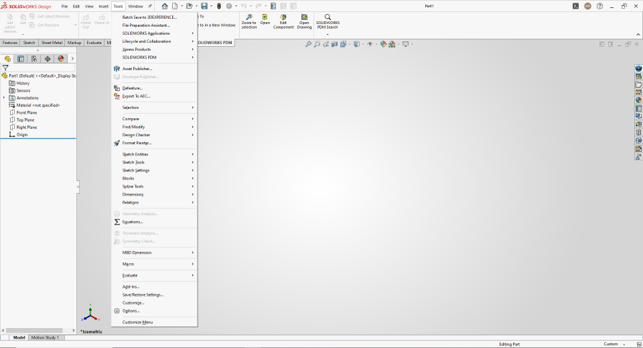
Menu: Tools, Equations
Shortcut Menu: Right click the Equation Folder and Click Manage Equations.
Using operators and Function:
- Addition +
- Subtraction –
- Multiplication *
- Division /
- Raise to a power ^
Functions
sin( ) | cotan( ) | arccotan( ) | int( ) |
cos( ) | arcsin( ) | abs( ) | sgn( ) |
tan( ) | arccos( ) | exp( ) | if( ) (can use =,<= or=> for comparison) |
sec( ) | atn( ) | log( ) | |
cosec( ) | arcsec( ) | sqr( ) |
How to Create Equations & Global Variables
Access via Menu
Go to Tools → Equations from the top menu bar to open the
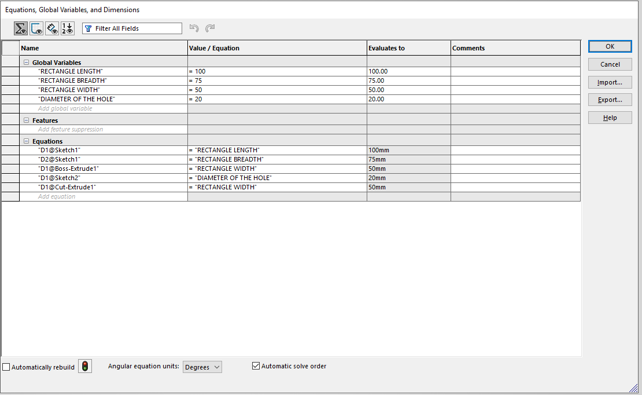
Equations, Global Variables, and Dimensions dialog box.
Under the Global Variables section, click the empty cell in the “Name” column and type your variable name (e.g.,RECTANGLE LENGTH, RECTANGLE BREADTH, RECTANGLE WIDTH, DIAMETER OF THE HOLE.).
Add a New Global Variable
Under the Global Variables section, click the empty cell in the “Name” column and type your variable name (e.g.,RECTANGLE LENGTH, RECTANGLE BREADTH, RECTANGLE WIDTH, DIAMETER OF THE HOLE.).
Link to a Dimension
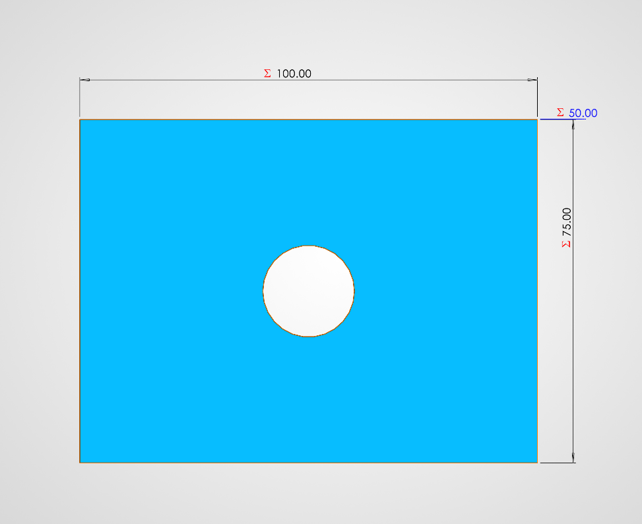
Double-click a dimension on your sketch or model, and in the value box type = RECTANGLE LENGTH to link it. The dimension turns teal to indicate it’s equation-driven.
If the equation was linked to the Dimension, it shows the summation symbol in the prefix of the dimension.
Real-World Use Cases
1. Fastener Design
Head diameter, shank length, and thread pitch all linked to a single bolt diameter variable
2. Enclosure Sizing
Wall thickness, boss heights, and rib spacing all driven from a single “shell thickness” global variable.
3. Gear Design
Module, number of teeth, and pitch circle diameter all linked through gear ratio equations.
4. Structural Frames
Beam cross-sections sized as fractions of span length using equations for consistent proportions.
5. Sheet Metal
Bend radius and flange lengths automatically adjusted based on material thickness variable.
Advantages of Using Equations & Global Variables
- Centralized Design Control — Change one value and the entire model updates.
- Eliminates Dimensional Errors
- Faster Design — Engineers can change dimension in design quickly by adjusting global variable
- Captures Design Intent
- Applicable at Part & Assembly Level — Global variables work both in individual parts and at the assembly level, enabling top-down design approaches.

Authur:
Ajithkumar R is an SOLIDWORKS Application Engineer at EGS Computers India Pvt Ltd, specializing in 3D CAD design, technical supports, and engineering solutions. With hands-on expertise in SOLIDWORKS, he supports engineers and designers streamline their workflows