

EGS INDIA

+91 9445424704

info@egs.co.in

Authorized SOLIDWORKS RESELLER in Chennai, Coimbatore, Trichy

EGS INDIA

+91 9445424704

info@egs.co.in

Authorized SOLIDWORKS RESELLER in Chennai, Coimbatore, Trichy

Authorized SOLIDWORKS RESELLER in Chennai, Coimbatore, Trichy

How to envelope an assembly in SOLIDWORKS?

Introduction

While working with large or complex assemblies, users facing a lag in SOLIDWORKS Performance. By using Envelopes in SOLIDWORKS Assembles we can overcome the problem. In the following content elaborated how envelopes in assemblies helps to make this possible.

Assembly Envelopes

It is a special type of assembly component which can be used as a reference component. Envelope components are ignored in global assembly operations such as bills of materials and mass properties and excluded from Interference Detection. In Assembly, the mirror or pattern of an envelope component is also an envelope. You can identify the envelope components in the Feature Manager Design Tree by the following icons.

           envelope componentEnvelope Component                      envelope subassemblyEnvelope Subassembly

How to make an Envelope component in assembly

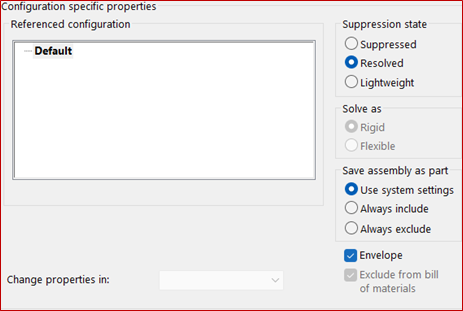
In an assembly, right click a component or subassembly in Feature Manager Design Tree and click Component Properties. In that tab, Select Envelope in the bottom right corner and it automatically selected Exclude form bill of materials which excludes the component or subassembly from BOM.

BOM

configuration specific properties

Envelopes as Reference Components

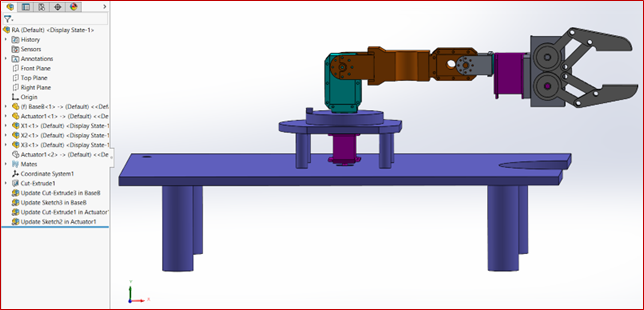
The primary function to use envelopes as reference components. We can add components as envelope, which are not belong to the assembly. It helps you to identify how to size and position the functional assembly components. Let’s see an example here.
functional assembly
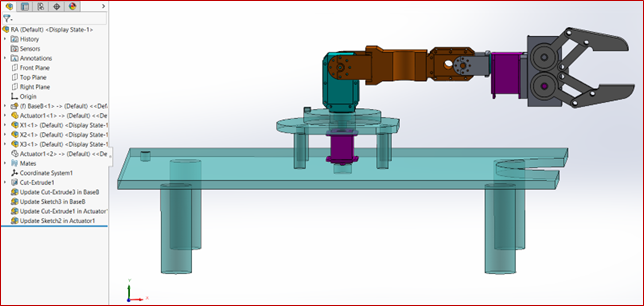
model with the base component as a reference. But the base part will load every time opening & saving the assembly and includes in geometry. So that, we could made the part as envelope component to not appear on the BOM & not used in mass property calculations.
geometry

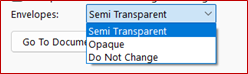
The appearance can be controlled in three categories
on the system options > Colors> Envelopes semi transparent
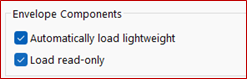
We can also improve the performance by
made the envelope components to load
“lightweight and read-only” while opening
the complex or large assembly in
system options > Assemblies > Envelope Components.envelope components
 

Benefits of Assembly Envelopes in SOLIDWORKS

  • Though weight was not added, the center of gravity calculations is excluded in the assembly.
  • Do not appear in BOM which helps in the detailing manufacturing document.
  • Define the clearance zones to prevent interference with critical components.
  • Improve in Large Assembly Performance whether it can be simplified or complex geometry and useful in Top-Down Design approach.
  • Include or exclude envelopes during interference detection which helps in testing constraints without affecting real parts.
viknesh

Viknesh C

An Elite Application Engineer for SOLIDWORKS, specializing in supporting 3DEXPERIENCE SOLIDWORKS solutions. With extensive hands-on experience in delivering value-added services and guiding customers to effectively use and apply SOLIDWORKS tools over the years. Deep knowledge of these solutions enables users to optimize their experience and fully leverage the SOLIDWORKS powerful capabilities.

Scroll to Top