

Automate Design Exploration with Parametric Design Study in SIMULIA Fluid Dynamics Engineer
Modern engineering organizations are under constant pressure to develop higher-performing products while reducing development costs and accelerating time-to-market. Whether designing thermal management systems, electronic enclosures, industrial machinery, HVAC equipment, consumer products, or energy systems, engineers must evaluate multiple design alternatives before arriving at an optimal solution.
Traditionally, design exploration involves manually modifying geometry, updating simulation inputs, running analyses, reviewing results, and repeating the process numerous times. This approach can be time-consuming, resource-intensive, and often limits the number of design alternatives that can be evaluated within project deadlines.
Parametric Design Study within the SIMULIA Fluid Dynamics Engineer role on the 3DEXPERIENCE® platform helps organizations automate design exploration and systematically evaluate multiple design scenarios, enabling faster and more informed engineering decisions.
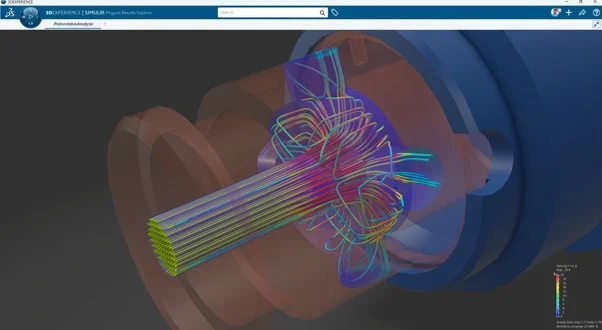
Explore More Design Possibilities with Automated Parametric Studies
The Design Variables Manager allows engineers to define the parameters that will be varied during a Parametric Design Study. For each variable, users can specify the current value, allowable range, and step size, providing complete control over the design space to be explored.
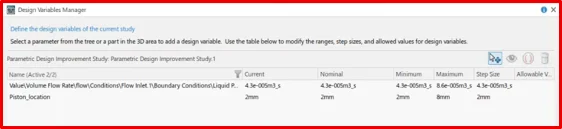
In the example shown, inlet flow rate and piston position are defined as design variables. Based on the specified ranges, the platform automatically generates and evaluates multiple simulation scenarios, eliminating the need to manually create separate studies for each design iteration.
Typical variables used in fluid flow and thermal studies include:
- Geometric dimensions and component positions
- Inlet and outlet flow rates
- Pressure boundary conditions
- Heat generation rates and thermal loads
- Material properties and operating conditions
By varying these parameters virtually, engineers can quickly evaluate how design changes influence product performance. This helps identify optimal configurations while reducing the effort associated with manually creating and running multiple simulation studies.
Define Response Variables and Optimization Objectives
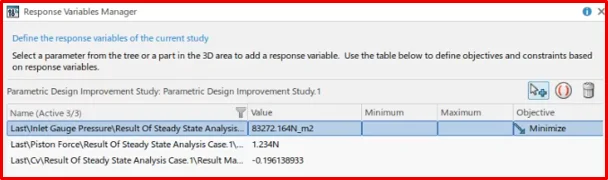
Once the design variables are defined, the next step is to specify the performance metrics that will be monitored during the study. Using the Response Variables Manager, engineers can select simulation results and define optimization objectives such as minimizing, maximizing, or targeting a specific value.
In the example shown, response variables including inlet pressure, piston force, and velocity are extracted directly from the simulation results. An objective has been assigned to minimize inlet gauge pressure, allowing the study to automatically identify design configurations that achieve lower pressure losses.
Common response variables used in fluid flow and thermal studies include:
- Pressure drop across a system
- Flow rate and flow uniformity
- Velocity at critical locations
- Temperature and heat transfer performance
- Force and load reactions
- Energy consumption and pumping power
By linking simulation outputs to study objectives, engineers can quickly compare multiple design configurations and identify the solutions that best meet performance requirements.
Automate Multiple Simulation Scenarios
Once the parameters are defined, engineers can create a Parametric Design Study that automatically generates and evaluates multiple design combinations.
The platform manages the simulation workflow, removing the need to manually modify geometry, reapply boundary conditions, or recreate simulation setups for each variation.
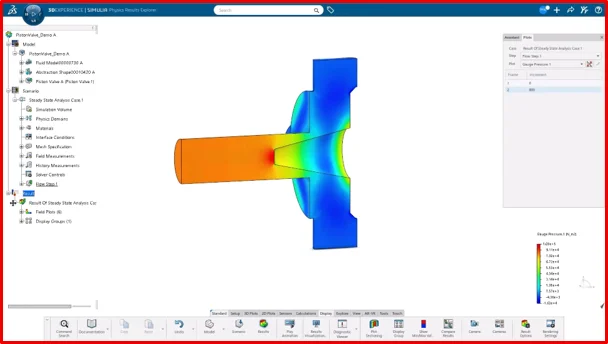
This automation helps organizations:
- Compare multiple design concepts simultaneously.
- Understand performance trends across different configurations.
- Reduce engineering effort spent on repetitive tasks.
- Increase confidence in design decisions.
- Evaluate more alternatives within existing project schedules.
By leveraging cloud-based computing resources available through the 3DEXPERIENCE platform, teams can efficiently process large numbers of simulation scenarios and accelerate design optimization activities.
Compare Results and Make Data-Driven Decisions
A major advantage of Parametric Design Study is the ability to compare results from multiple scenarios within a single environment.
Engineers can evaluate the impact of design changes on key performance metrics such as:
- Temperature distribution
- Flow characteristics
- Pressure losses
- Heat transfer efficiency
- Energy consumption
Product reliability
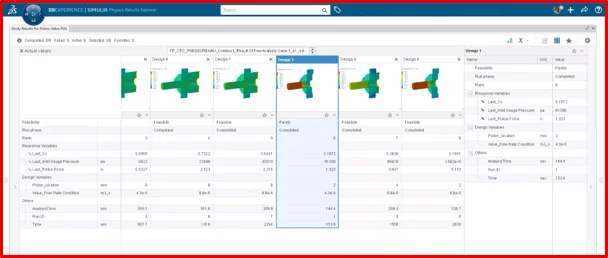
The resulting data provides objective engineering evidence that supports better decision-making and helps identify the most effective design solutions.
Rather than relying solely on assumptions or limited physical testing, teams can use simulation-driven insights to optimize product performance early in the development process.
Improve Collaboration and Maximize Engineering ROI
Parametric Design Study operates within the 3DEXPERIENCE platform, ensuring that design data, simulation models, study configurations, and results remain connected throughout the product development process. This enables design engineers, analysts, and project stakeholders to work from the same data set, reducing information silos and improving decision-making.
Key advantages include:
- Centralized access to design and simulation data.
- Better visibility of parameter changes and their impact on performance.
- Improved traceability of simulation-driven design decisions.
- Reduced rework caused by disconnected files and workflows.
- Faster review cycles through a shared collaborative environment.
Parametric Design Study automates the evaluation of multiple design alternatives, allowing engineers to focus on performance improvement rather than repetitive simulation setup. This helps reduce development time, minimize physical prototyping, and make more informed design decisions.
By combining SIMULIA Fluid Dynamics Engineer with the 3DEXPERIENCE platform, organizations can accelerate design optimization, improve collaboration, and maximize the value of their simulation investments.

