

Curve Through XYZ Points in SOLIDWORKS - Create 3D Curves and Coordinate Systems
In modern product design, working with complex geometries often requires importing coordinate-based data. SOLIDWORKS provides a powerful feature called Curve Through XYZ Points, which allows users to generate 3D curves directly from external data sources like Excel.
This blog explains how to:
- Create a 3D curve using Excel data
- Generate a coordinate system based on that curve
- Leverage new enhancements in recent SOLIDWORKS versions
Why Use Curve Through XYZ Points?
The Curve Through XYZ Points feature is highly versatile and can be used in multiple applications such as:
- Creating sweep paths
- Defining loft guide curves
- Generating parting lines for draft features
This makes it especially useful when working with scanned data, analytical coordinates, or imported datasets.
Can We Import Excel Data into SOLIDWORKS?
Yes — SOLIDWORKS allows you to create a 3D curve using coordinate data from Excel.
Step 1: Prepare Coordinate Data in Excel
Start by organizing your data in Excel with three columns:
- X Coordinate
- Y Coordinate
- Z Coordinate
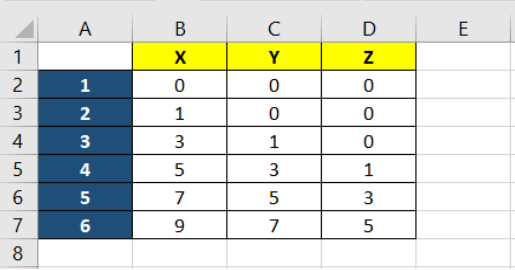
Once completed:
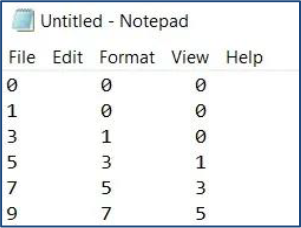
- Save the file as a .txt (Text File) format
Step 2: Create Curve in SOLIDWORKS
Follow these steps to import the data:
- Navigate to:
Insert → Curves → Curve Through XYZ Points - Click Browse and select your .txt file
- Click OK
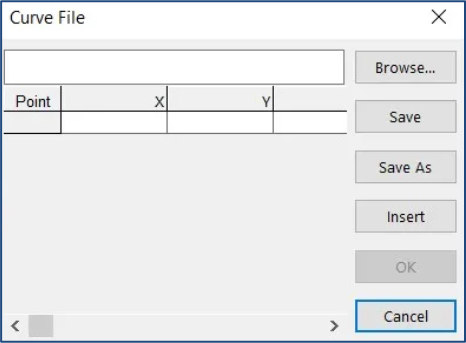
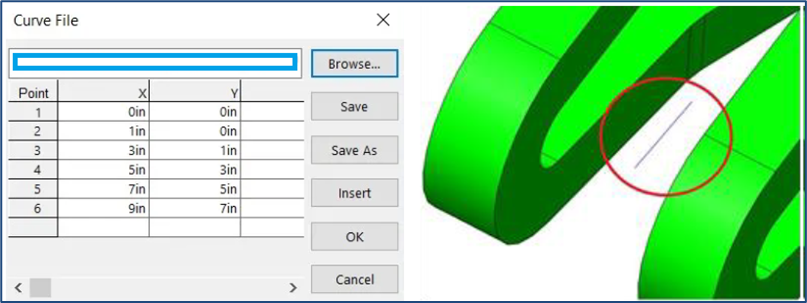
A 3D curve will be automatically generated.
Note:You do not need to activate any sketch plane. The curve is directly created in3D space.
Creating a Coordinate System from the Curve
Once the curve is created, you can use it to define a coordinate system.
Step 3: Define Coordinate System
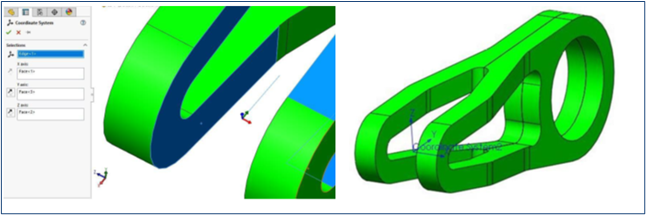
- Go to: Insert → Reference Geometry → Coordinate System
- Select the starting point of the curve as the origin
- Define axis directions using:
- Edges
- Faces
- Vertices
- Adjust orientation using the Reverse Axis Direction option if required
Important:
The starting point of the curve becomes the origin (0,0,0) of the coordinate system.
What’s New in SOLIDWORKS 2022?
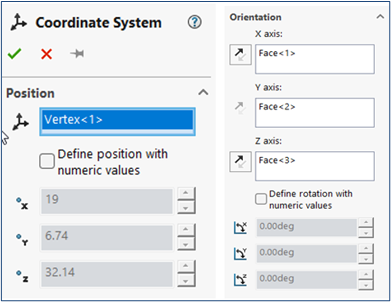
In SOLIDWORKS 2022, coordinate systems can also be defined using numeric values.
How it works:
- In the Coordinate System Property Manager:
- Enable Define position with numeric values
- Enter X, Y, Z values for position and orientation
Note:
These values are relative to the local origin, not the global origin.
Benefits of Using Coordinate Systems
Defining coordinate systems improves efficiency in multiple areas:
- Accurate measurement and mass property calculations
- Better handling of imported models
- Simplified and precise assembly mating
Conclusion
Using Curve Through XYZ Points along with coordinate systems in SOLIDWORKS helps bridge the gap between external data and parametric modelling. Whether you’re working with scanned data, simulation results, or Excel-based coordinates, this workflow ensures precision and flexibility in your design process.

Authur:
Bhuvan Kumar A is an Elite Application Engineer with 5+ years of experience in SOLIDWORKS portfolios and product design solutions. He specializes in enabling teams to deliver high-quality designs using advanced CAD & PLM tools, with strong expertise in platforms like 3DEXPERIENCE and PDM.

